

Millions of people spend their days sitting at desks, often experiencing discomfort that ranges from mild stiffness to debilitating pain. The chair you sit in plays a crucial role in determining whether you end your workday feeling energized or exhausted. Understanding how adjustable features work and why they matter can transform your daily comfort and long-term spinal health.
Back pain has become one of the most common workplace complaints. However, much of this discomfort is preventable. The difference between a painful workday and a comfortable one often comes down to choosing a chair with the right adjustable features and knowing how to use them properly.
This comprehensive guide explores how adjustable office chairs protect your back, which features matter most, and how to optimize your seating for maximum comfort and health benefits.
The Connection Between Seating and Spinal Health
Your spine is a complex structure designed for movement, not prolonged sitting. When you sit, especially in a poorly designed chair, your spine experiences pressure differently than when you stand or walk. This pressure can lead to muscle fatigue, disc compression, and chronic pain over time.
Every person’s body is unique. We all have different heights, leg lengths, torso proportions, and natural spinal curves. Therefore, a chair that works perfectly for one person might cause discomfort for another. This is precisely why adjustability is so important.
Fixed chairs force your body to adapt to them, often creating awkward positions that strain muscles and compress nerves. Adjustable chairs, on the other hand, adapt to your body’s specific needs. This customization allows you to maintain proper alignment throughout the day.
Additionally, your body’s needs change during the day. You might prefer different positions for focused computer work versus phone calls or reading. Adjustable chairs give you the flexibility to shift positions while maintaining support.
Why Seat Height Matters More Than You Think
The ability to adjust your chair’s height is perhaps the most fundamental feature for preventing back pain. When your seat height is correct, it creates a foundation for proper posture throughout your entire body.
Proper height adjustment ensures your feet rest flat on the floor with your knees bent at approximately 90 degrees. This position stabilizes your lower body and prevents you from slouching or perching uncomfortably on the edge of your seat. When your feet dangle or your knees are too high, your body compensates by shifting weight unevenly, which strains your lower back.
Furthermore, correct height positioning affects your desk and keyboard placement. If your chair is too low, you’ll reach upward to type, raising your shoulders and creating neck tension. Conversely, if your chair is too high, you’ll hunch forward and downward, rounding your spine and straining your upper back.
The relationship between seat height and your work surface cannot be overstated. Your elbows should form a 90-degree angle when your hands rest on your keyboard. This alignment keeps your shoulders relaxed and prevents the forward head posture that causes neck and shoulder pain.
Many people set their chair height once and forget about it. However, you might need different heights for different tasks. Some people prefer sitting slightly higher for detailed work that requires leaning forward, then lowering the chair for relaxed computer work.
Understanding How Recline Mechanisms Support Your Back
A quality recline mechanism allows you to shift your weight and change your sitting angle throughout the day. This adjustability is crucial for preventing the muscle fatigue that comes from static positioning.
When you recline slightly, you redistribute pressure from your lower back to the chair’s backrest. This transfer reduces the load on your lumbar spine and gives your back muscles a chance to relax. Studies show that a slight recline of 110 to 120 degrees actually reduces pressure on spinal discs compared to sitting perfectly upright.
Different recline mechanisms offer varying levels of control. Basic models allow you to lock the backrest in an upright or reclined position. More advanced systems let you adjust the tension, so the chair reclines smoothly based on your body weight. The best mechanisms allow you to lock the chair at multiple angles, giving you options throughout your workday.
The tension adjustment feature is particularly valuable. It prevents the chair from tilting too easily for heavier individuals or requiring too much effort for lighter people. When properly adjusted, you should be able to recline with gentle pressure and return to upright without struggling.
Some advanced chairs feature synchronized tilt, where the seat and backrest move together at predetermined ratios. This coordinated movement maintains better support as you shift positions. The seat tilts slightly forward when you lean back, keeping your feet grounded and preventing you from sliding forward.
Lumbar Support Adjustability Protects Your Lower Back
Your lower back has a natural inward curve called lordosis. Maintaining this curve while sitting is essential for preventing pain and disc problems. Adjustable lumbar support helps you maintain this natural alignment.
Without proper support, your lower back tends to flatten or round backward when sitting. This position stretches ligaments and puts excessive pressure on the front of your spinal discs. Over time, this stress can lead to disc degeneration and chronic pain.
Adjustable lumbar support lets you position the backrest’s curve exactly where your lower back curves inward. This customization is crucial because everyone’s lordotic curve sits at a slightly different height. What works for a six-foot-tall person won’t work for someone who’s five feet two.
The best chairs offer both height and depth adjustment for lumbar support. Height adjustment moves the support up or down your spine. Depth adjustment pushes the support forward or allows it to recede, controlling how much it presses into your back.
Some people need firm lumbar support, while others prefer gentle encouragement. The ability to adjust depth means you can find the right amount of support for your body. Too much pressure feels uncomfortable and causes you to sit forward. Too little fails to maintain your natural curve.
Armrest Adjustability Reduces Upper Body Strain
While armrests might seem unrelated to back pain, they actually play a significant role in upper body comfort. Properly adjusted armrests prevent you from hunching your shoulders or leaning to one side, both of which create back strain.
Adjustable armrests should move up and down, allowing you to set them at a height where your shoulders stay relaxed. When armrests are too high, they force your shoulders upward, creating tension that extends down your back. When they’re too low, you lean sideways or forward to use them, twisting your spine.
Additionally, width-adjustable armrests let you position them close to your body. This prevents you from reaching outward, which can cause you to twist or lean. Your elbows should rest comfortably on the armrests with your upper arms hanging naturally from your shoulders.
Some advanced chairs offer pivoting armrests that angle inward or outward. This feature is particularly helpful when typing, as it allows your arms to follow their natural position rather than forcing them parallel.
The ability to flip armrests up or remove them entirely is useful for people who prefer working without them or who need to sit very close to their desk. Flexibility in this area prevents the armrests from becoming obstacles that force poor posture.
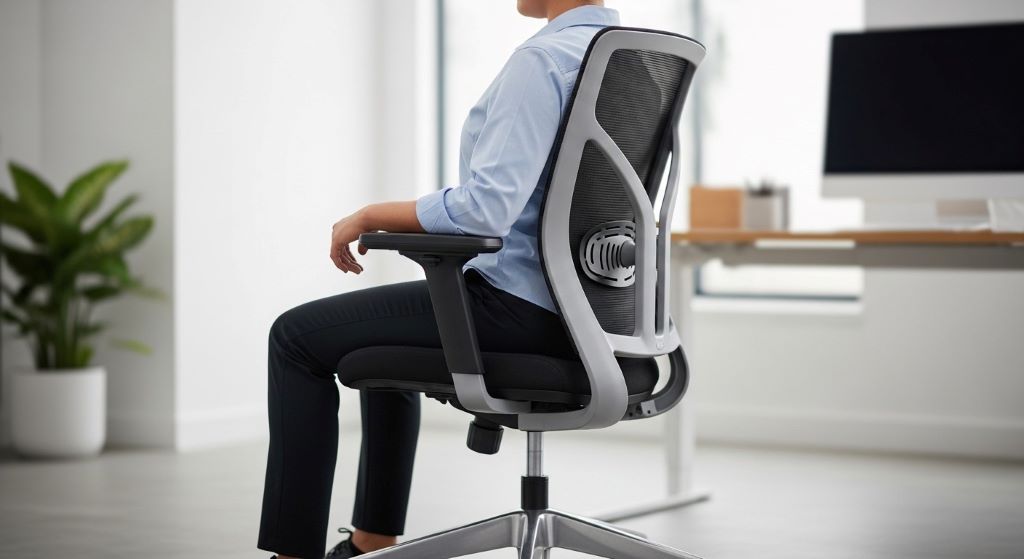
Seat Depth Adjustment Accommodates Different Body Types
Seat depth refers to the distance from the front edge of the seat to the backrest. This measurement significantly impacts your comfort and ability to use the chair’s back support effectively.
If the seat is too deep for your legs, you face a difficult choice. You can either sit back and use the lumbar support, leaving your feet dangling and pressure behind your knees, or sit forward with your feet flat, losing all back support. Neither option is acceptable for long-term sitting.
Conversely, if the seat is too shallow, your thighs won’t be adequately supported. You’ll feel like you’re perching on the edge, which causes you to lean forward and round your back.
Adjustable seat depth solves these problems by letting you customize the chair to your leg length. Generally, you should have about two to four inches of space between the back of your knees and the seat edge when sitting with your back against the backrest.
This adjustment is particularly important for people at the extremes of height ranges. Very tall individuals need deeper seats to support their longer thighs. Shorter people need shallower seats to maintain proper posture without pressure behind their knees.
The Science Behind Dynamic Sitting
The human body isn’t designed for static positions, even correct ones. Movement promotes circulation, prevents muscle fatigue, and keeps joints mobile. Adjustable chairs support dynamic sitting by allowing position changes throughout the day.
When you can easily adjust your chair’s various features, you’re more likely to shift positions regularly. This movement prevents the stiffness and discomfort associated with remaining in one position for hours. Even small adjustments, like reclining slightly or changing your seat height, engage different muscles and relieve pressure points.
Research shows that alternating between slight forward tilt, upright sitting, and gentle recline throughout the day reduces fatigue and discomfort. Adjustable chairs make these transitions effortless, encouraging you to move more frequently.
Furthermore, the ability to adjust your chair for different tasks promotes better ergonomics overall. You might sit more upright for typing, recline for phone calls, and tilt forward for writing notes. Each position serves a purpose, and adjustability makes it practical to optimize your posture for each activity.
How to Properly Adjust Your Chair for Maximum Benefit
Having an adjustable chair means nothing if you don’t know how to set it up correctly. Take time to systematically adjust each feature for your body and workspace.
Start with seat height, as this forms the foundation for all other adjustments. Sit with your feet flat on the floor. Adjust the height until your knees bend at roughly 90 degrees and your thighs are parallel to the floor or angled slightly downward.
Next, adjust the seat depth if your chair offers this feature. Sit all the way back against the backrest. Check the space behind your knees. If you can fit two to four fingers between the seat edge and the back of your knee, the depth is correct.
Move on to lumbar support. The supportive curve should align with your lower back’s natural inward curve, typically just above your belt line. Adjust the height and depth until it feels supportive without being intrusive.
Set your armrests so your shoulders remain relaxed when your forearms rest on them. Your elbows should form approximately 90 degrees. The armrests should support your arms without raising your shoulders or causing you to lean sideways.
Finally, adjust the recline tension to match your body weight. You should be able to recline with gentle pressure but not feel like the chair is pushing you forward. Test the recline mechanism and lock it at angles you find comfortable for different tasks.
Common Adjustment Mistakes to Avoid
Even with the best intentions, people often make errors when adjusting their chairs. Recognizing these mistakes helps you optimize your setup.
Many people set their chair too high because they’re trying to reach a desk that’s also too high. This creates a cascade of problems. Instead, lower your chair to the correct height for your body, then adjust your desk or keyboard tray accordingly.
Another common mistake is using lumbar support that’s positioned too high or too low. The support should align with your actual lower back curve, not where you think it should be. Pay attention to where you naturally feel the backrest touching your back when you sit properly.
Setting the recline tension too loose or too tight defeats the purpose of the mechanism. If it’s too loose, you’ll constantly fight to stay upright. If it’s too tight, you won’t use the recline feature at all, missing out on its benefits.
Some people adjust their chair once and never revisit the settings. However, your body changes over time, and different shoes or clothing can affect your sitting position. Periodically reassess your adjustments to ensure they still serve you well.
The Long-Term Health Benefits of Proper Chair Adjustment
Investing time in proper chair adjustment pays dividends beyond daily comfort. The long-term benefits significantly impact your overall health and quality of life.
Preventing back pain is obviously the primary benefit. However, proper sitting also reduces your risk of developing chronic conditions like herniated discs, sciatica, and degenerative disc disease. These conditions can be debilitating and difficult to treat, making prevention crucial.
Additionally, good posture supported by proper chair adjustment reduces strain on your entire musculoskeletal system. You’ll experience less neck pain, fewer headaches, and reduced shoulder tension. These benefits extend beyond work hours, improving your overall daily comfort.
Proper ergonomics also boost productivity and focus. When you’re not distracted by discomfort, you can concentrate better on your work. You’ll feel less fatigued at the end of the day, leaving more energy for activities you enjoy.
Moreover, developing good sitting habits now protects your future mobility and independence. The cumulative effect of poor posture over decades can lead to permanent changes in spinal alignment and function. Taking care of your back today ensures better mobility as you age.
When to Consider Upgrading Your Chair
Not all chairs offer adequate adjustability, and knowing when to upgrade is important for protecting your health.
If your current chair lacks basic adjustments like seat height or lumbar support, upgrading should be a priority. These features are essential, not luxuries. A chair that doesn’t fit your body properly will cause problems regardless of how expensive it was or how good it looks.
Consider upgrading if you experience persistent discomfort despite adjusting your current chair as well as possible. Sometimes a chair simply doesn’t work for your body type or specific needs. Continuing to use it won’t improve the situation.
Additionally, chairs wear out over time. If your chair’s adjustment mechanisms no longer hold their positions or the cushioning has compressed significantly, it’s time for a replacement. A broken or worn-out adjustable chair offers no more benefit than a fixed chair.
Watch for signs that your chair isn’t meeting your needs. Frequent shifting, inability to find a comfortable position, or needing to stand frequently due to discomfort all indicate that your current seating isn’t adequate.
Complementing Your Adjustable Chair with Good Habits
Even the best adjustable chair can’t overcome poor habits. Combining proper equipment with healthy practices maximizes your comfort and back health.
Remember to take regular movement breaks throughout your day. Stand up, stretch, and walk around every 30 to 45 minutes. These breaks relieve muscle tension and promote circulation, complementing the benefits of your adjustable chair.
Practice conscious posture awareness. Periodically check in with your body throughout the day. Are you still sitting properly, or have you gradually slouched forward? Gentle reminders help you maintain good habits.
Strengthen your core muscles through regular exercise. Strong abdominal and back muscles make maintaining proper posture easier and less tiring. Your chair provides support, but your muscles do the real work of holding you upright.
Stay hydrated and manage stress. Both factors affect muscle tension and your body’s ability to maintain comfortable positions. A holistic approach to health enhances the benefits of your ergonomic setup.
Conclusion
Adjustable office chairs are powerful tools for preventing back pain and promoting long-term spinal health. The ability to customize seat height ensures proper alignment with your desk and keyboard while keeping your feet grounded. A quality recline mechanism lets you redistribute pressure throughout the day, giving your back muscles essential rest.
Beyond these key features, adjustable lumbar support, armrests, and seat depth allow you to tailor the chair to your unique body proportions. This customization transforms sitting from a source of pain into a sustainable, comfortable position you can maintain throughout your workday.
However, adjustability only helps if you use it correctly. Taking time to properly set up your chair and periodically reassessing your adjustments ensures you receive maximum benefit. Combined with regular movement breaks and good posture habits, an adjustable chair becomes a foundation for lasting comfort and health.
The investment in a quality adjustable chair and the effort to optimize its settings pay enormous dividends in reduced pain, improved productivity, and better long-term health. Your back deserves this level of care and attention.
Frequently Asked Questions
How often should I adjust my office chair throughout the day?
While you should set your basic adjustments once for your body proportions, feel free to make small changes throughout the day based on your activities. Many people benefit from slight recline adjustments or seat height changes when switching between different tasks. Listen to your body and adjust whenever you notice discomfort developing.
Can an adjustable chair completely eliminate back pain?
An adjustable chair is a crucial component of back pain prevention, but it’s not a complete solution on its own. Combining proper seating with regular movement, good posture habits, core strengthening exercises, and overall wellness creates the best results. If you have existing back problems, consult a healthcare provider for comprehensive treatment.
What’s the most important adjustable feature to look for in an office chair?
While all adjustable features contribute to comfort, seat height adjustment is the most fundamental. Without proper height adjustment, you cannot achieve correct alignment with your desk or maintain proper leg positioning. After height, lumbar support adjustability is typically the next most important feature for preventing back pain.
How do I know if my chair adjustments are correct?
Correct adjustments feel comfortable and allow you to work without strain. Your feet should rest flat on the floor, your back should feel supported without pressure points, and your shoulders should stay relaxed. If you can work for an hour without developing discomfort, your adjustments are likely correct. Taking a photo of yourself from the side can help you check your alignment.
Is it worth spending more money on advanced adjustment features?
The value depends on your specific needs and how much time you spend sitting. If you work at a desk for many hours daily, advanced features like synchronized tilt or multi-position locking provide significant benefits that justify higher costs. These features promote movement and position changes that prevent the problems associated with static sitting.
Related Topics:
Functional Fitness Gym Workouts for Everyday Tasks
How to Make Apple Pie Moonshine Recipe: A Step-by-Step Guide


