
You finally adjusted your chair, set your monitor to eye level, and positioned your keyboard perfectly—yet you still end the day with tired eyes, a sore neck, or a dull headache. The missing piece is often lighting. Even the best ergonomic setup fails when harsh glare, uneven brightness, or poor contrast forces your eyes to work overtime. The solution isn’t just buying any lamp; it’s about pairing deliberate monitor placement with lighting that complements it. For many people, exploring ergonomic Airlonv desk lamp options is a practical starting point because these fixtures are designed to reduce flicker and provide balanced illumination. Before you buy anything, though, you need to understand how light and screen position interact.
Quick Answer
To combine monitor placement and desk lighting for better comfort, position your screen perpendicular to windows, place the monitor at arm’s length with the top of the screen at or slightly below eye level, and use a bias light behind the monitor to reduce contrast. For your desk lamp, aim for indirect lighting that illuminates your workspace without casting glare onto the screen. The goal is to create a balanced light environment where the brightest area in your peripheral vision is not the monitor itself.
Key Takeaways
- Place your monitor perpendicular to windows and avoid having a lamp directly behind or in front of the screen.
- Use a bias light behind the monitor to reduce the contrast ratio between the bright screen and the darker wall.
- Choose a desk lamp with adjustable brightness and a warm-to-neutral color temperature to match your activity.
- Position the desk lamp to the side of your dominant hand, but never between your eyes and the screen.
- Reduce overhead lighting intensity; a dimmer room with targeted task lighting is usually more comfortable than a brightly lit room.
Why Monitor Placement and Lighting Must Be Planned Together
Most people set up their monitor first and then add lighting as an afterthought. That approach creates avoidable problems. Your monitor emits light, and the room around it either absorbs, reflects, or adds to that light. When the ambient lighting is too dim, your pupils dilate, making the bright screen feel harsh. When the ambient lighting is too bright, especially from an overhead fixture, you get glare on the screen surface. When a lamp sits behind you, it casts your own shadow onto the desk and can reflect off the screen. The only way to avoid these issues is to consider the monitor and the lamp as one integrated system.
The 20-20-20 Rule Is Not Enough
You have probably heard the advice to look at something 20 feet away for 20 seconds every 20 minutes. That rule helps reduce eye strain from focusing fatigue, but it does nothing about the constant struggle between your screen brightness and the surrounding light. If your desk lamp creates a bright spot right next to your monitor, your eyes continuously adjust between those two light levels. That rapid, repeated adjustment is a primary cause of eye fatigue, even when you take regular breaks. Proper lighting design eliminates that struggle in the first place.
Step-by-Step: Positioning Your Monitor First
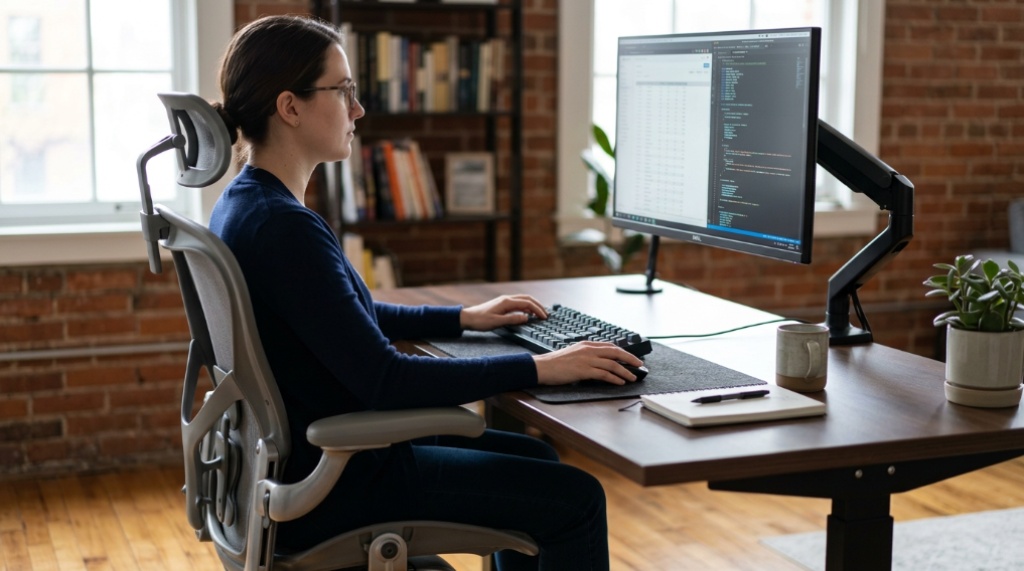
Before you touch your lamp, get the monitor position right. This is the foundation. If the screen is too high, too low, or angled poorly, no lamp will fix the resulting neck and eye strain.
- Set the height: Sit upright with your shoulders relaxed. The top bezel of the monitor should be at or slightly below your eye level. You should be looking slightly downward at the center of the screen, roughly 15 to 20 degrees below your horizontal line of sight.
- Set the distance: Sit back in your chair and extend your arm. Your fingertips should just touch the monitor screen. If you have a large monitor (27 inches or bigger), you may need to push it slightly farther back to keep the entire screen within your natural field of view.
- Eliminate direct glare: If you can see a window, a bright wall, or a lamp reflected on the screen, change the monitor angle or move the light source. Tilting the screen slightly downward can help, but the better fix is to reposition the light or the monitor.
- Face the monitor straight on: Do not twist your neck to look at the screen. The monitor should be centered on your body, not off to one side. If you use two monitors, the primary one should be directly in front of you, and the secondary one should be angled to the side.
Window Placement: The Most Overlooked Factor
Windows are the most common source of both glare and contrast problems. If your monitor faces a window, the bright daylight behind the screen makes the display look washed out. If the window is behind you, it reflects off the screen. The ideal position is to have the window to your side, perpendicular to your line of sight. If that is not possible, use blinds or sheer curtains to diffuse the daylight. Do not rely on your desk lamp to fix a glare problem caused by a window; it cannot.
Choosing the Right Desk Lamp Type for Screen Work
Once the monitor is correctly placed, the lamp becomes a tool for balancing the light in the room. Not every lamp works well for this. A traditional incandescent desk lamp with a single bright bulb pointed directly at your keyboard will create a hot spot that competes with the screen. Instead, look for lamps that offer diffused, indirect, or adjustable lighting. When you evaluate ergonomic Airlonv desk lamp options, you are looking for features like adjustable color temperature, stepless dimming, and a design that directs light away from your eyes and screen.
Direct vs. Indirect Lighting
Direct lighting shines straight down onto your work surface. This is useful for reading paper documents or writing notes, but it creates a harsh contrast with the monitor. Indirect lighting bounces light off the ceiling or a wall, creating a soft, even glow. For computer work, indirect lighting is generally more comfortable. If your lamp only offers direct light, angle it so the beam hits the desk in front of the keyboard, not the screen or your face.
Color Temperature and Brightness Settings
Color temperature is measured in Kelvin (K). Lower numbers (around 3000K) produce warm, yellowish light that feels relaxing. Higher numbers (around 5000K–6500K) produce cool, bluish light that increases alertness but can contribute to eye strain over long sessions. For evening work, use a warm setting. For daytime work, a neutral or slightly cool setting can help you stay focused. The key is to match the lamp’s color temperature to the time of day and to the brightness of your screen. If your screen is very bright, your ambient light should also be relatively bright to reduce contrast. If your screen is dim, lower the lamp brightness accordingly, To create an all-around productive workspace, make sure to pair your ergonomic lighting adjustments with tips from our guide on design the best minimalist office setup for better focus.
How to Position the Desk Lamp for Maximum Comfort
Lamp placement is about reducing contrast and eliminating glare. Here is a practical approach that works in most home offices.
- Place the lamp on your non-dominant side: If you are right-handed, put the lamp on the left side of your desk. This prevents the lamp arm and your writing hand from casting shadows onto your work.
- Keep the lamp above eye level: The light source should be above your line of sight, so it does not shine directly into your eyes. If the lamp is too low, it becomes a glare source.
- Angle the light away from the screen: The beam should illuminate the desk surface, not the monitor. If you see the lamp’s reflection on the screen, move the lamp or adjust its angle.
- Use the lamp to light the wall behind the monitor: This is the single most effective change you can make. If the wall behind your monitor is dark and the screen is bright, your eyes constantly struggle with the contrast. A lamp aimed at that wall creates a bias light that reduces the perceived brightness of the screen.
Bias Lighting: The Hidden Comfort Tool
Bias lighting is a light source placed behind the monitor, aimed at the wall. It is not a desk lamp for reading or writing; it is a tool for reducing eye strain. When the wall behind your monitor is lit to about the same brightness as the screen, your pupils do not have to adjust as much when you look from the screen to the surrounding area. Many ergonomic desk lamps can be repositioned to act as bias lights, but you can also use a small LED strip or a dedicated bias light kit. The effect is subtle but noticeable within minutes. You will feel less eye fatigue, and the screen will appear to have better contrast without being harsh.
Common Lighting Mistakes That Cause Discomfort
Even with the right lamp, a few common errors can ruin your setup. Watch out for these.
- Relying only on overhead lights: Overhead ceiling lights are rarely positioned well for computer work. They create glare on the screen and cast shadows on the desk. Use them only as a base level of light and rely on your desk lamp for task lighting.
- Using a lamp with a bare bulb: A bare bulb creates a bright point source that is hard on the eyes. Always use a lamp with a shade, diffuser, or frosted bulb.
- Setting the lamp too close to the monitor: If the lamp is within a foot of the screen, it will reflect off the glass and create a distracting hot spot.
- Ignoring the wall behind the monitor: A dark wall in a dim room makes the screen feel blindingly bright. Even a simple lamp aimed at the wall can fix this.
- Choosing a lamp with only one brightness level: Your lighting needs change throughout the day. A lamp with stepless dimming lets you adjust as natural light fades.
Frequently Asked Questions
Should the desk lamp be brighter than the monitor?
No. The desk lamp should not be brighter than the monitor, and it should not be dramatically dimmer either. The goal is to balance the light in the room so that the monitor does not stand out as the only bright object. A good rule is to have the ambient light level be roughly equal to the brightness of the white areas on your screen.
Can I use a lamp with a cool white LED for work?
Yes, but only during daytime hours. Cool white light (5000K or higher) suppresses melatonin and helps with alertness. However, using it in the evening can disrupt your sleep cycle and increase eye strain. Switch to a warm color temperature (3000K or lower) in the evening hours.
What is the best light color for reading at a desk?
For reading paper documents, a neutral white light around 4000K is ideal because it provides good contrast without the harshness of cool blue light. For screen work, a warm-to-neutral light is more comfortable for extended sessions.
Is it better to use a floor lamp instead of a desk lamp?
Both can work. A floor lamp placed behind you or to the side can provide good ambient lighting. A desk lamp is more useful for targeted task lighting, such as reading documents or writing notes. For screen work, a floor lamp that lights the wall behind the monitor is often more effective than a desk lamp aimed at the keyboard.
How do I know if my lighting is causing eye strain?
If you notice squinting, frequent blinking, headaches after a few hours of work, or a feeling of dryness in your eyes, your lighting is likely part of the problem. A quick test: look away from your screen at a neutral wall. If the wall looks very dark compared to the screen, you need more ambient light. If you see reflections on the screen, you need to reposition your light sources.
Can I use natural daylight as my main light source?
Yes, but you must control it. Direct sunlight creates extreme glare and contrast. Use sheer curtains or blinds to diffuse the light. Position your monitor perpendicular to the window, and use your desk lamp to fill in the darker areas of the room.
Conclusion
Combining monitor placement and desk lighting is not about buying expensive equipment; it is about understanding how light interacts with your screen and your eyes. Start by positioning the monitor correctly, then use your desk lamp to balance the ambient light in the room. The most effective setup uses indirect lighting, a bias light behind the monitor, and a lamp with adjustable brightness and color temperature. When you get these elements working together, you will notice less eye fatigue, fewer headaches, and a generally more comfortable work environment. Take a few minutes to reposition your monitor and lamp today—your eyes will thank you by the end of the week.